
Smart Clock using faulty Lenovo Tab TB3-710i, with prayer azan
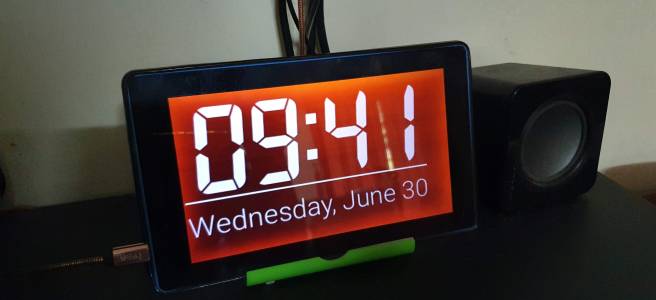
Yup... the screen is faulty and red 😀 What needed? A faulty or unused Lenovo Tab TB3-710i, or any other Android device (perhaps with big LCD screen)Day and night clock app (download here, or any other app which support Daydream)Device stand, DIY or a cheap oneA USB cable to charge (I charge from my TV)Optional: … Teruskan membaca Smart Clock using faulty Lenovo Tab TB3-710i, with prayer azan

How to allow Samsung Health on rooted device

Trying to open Samsung Health app and not allowed due to rooted device? Even installed the Magisk root app and passes the SafetyNet? Well, frustrating doesn't it? But you are probably not in bad luck totally. Try these steps on how to allow Samsung Health on rooted device. Install or run any file explorer app … Teruskan membaca How to allow Samsung Health on rooted device

Macrodroid Auto delete old WhatsApp backed up databases

This is just a simple Macrodroid auto delete old WhatsApp backed up databases. Obviously, to trim any older backed up databases so the phone memory usage (for WhatsApp folder) can be maintained low. The script find /storage/emulated/0/WhatsApp/Databases/ -type f -name '*.crypt12' -mtime +2 -exec rm {} ; Explanation First part is the path where the … Teruskan membaca Macrodroid Auto delete old WhatsApp backed up databases

Fix or use KLWP background on lock screen

My phone: S7 Edge (Exynos) Android Nougat Issue: Applied KLWP preset does not reflect the lock screen background. Solution: Download this live wallpaper chooser. Run the installed app and apply live wallpaper for Home and Lock screen at once. Uninstall the live wallpaper chooser. Restart phone. Apply the KLWP again. Notes: Not sure whether this the … Teruskan membaca Fix or use KLWP background on lock screen

MacroDroid Game Mode

The idea to create this macro/automation (with MacroDroid) is to reduce the power/sources consumption while my kids holding my phone... for games. Starting to higher performance, reduce to lowest performance and finally kill all the gaming apps. My phone spec: Samsung Galaxy S7 Edge Decent UltraLite 3.0 MacroDroid Rooted with TWRP SuperSU Notorious kernel Spectrum (kernel tool) … Teruskan membaca MacroDroid Game Mode

Disable bloatware from Apps Settings – S7 Edge (935FD)

I know there are other ways to disable bloatware packages by using app (such as Package Disabler Pro) but... in case if you are (or I am) wondering what apps can be disabled from Settings, here are the list. Just simply go to Settings > Apps > Show systems apps. Tap on these apps (1-by-1) and Disable. com.monotype.android.font.rosemary … Teruskan membaca Disable bloatware from Apps Settings – S7 Edge (935FD)

Aplikasi Android yang mesti aku install (mungkin anda juga)

Setiap pengguna telefon (Android / IOS) pasti akan install aplikasi yang dirasakan perlu. Samada untuk kerja, sosial, permainan dan lain-lain. Sebelum kita install sesuatu aplikasi, perlulah kita fikir pro & cons aplikasi tersebut, harga, saiz, permission, penggunaan data dan lain-lain. Dan untuk itu, berikut adalah sedikit perkongsian tentang aplikasi yang mesti ada di setiap telefon aku. … Teruskan membaca Aplikasi Android yang mesti aku install (mungkin anda juga)

Disable or deactivate Device Security (Smart Manager)

Device: S7 Edge (SM-G930FD) Android version: 6.0.1 Marshmallow Scenario: Accidentally activated the Device Security and not able to deactivate anywhere in Smart Manager app. Instructions to deactivate: Open the app drawer and select Settings --> Applications --> Application manager Click MORE menu on right top --> Show system apps Search for "COM.SAMSUNG.ANDROID.SM.DEVICESECURITY" and tap Tap the … Teruskan membaca Disable or deactivate Device Security (Smart Manager)