
This error / issue has been solved, at least on my PC.
Symptoms:
- Not able to access shared folder from other devices
- Not able to access shared folder from the same PC
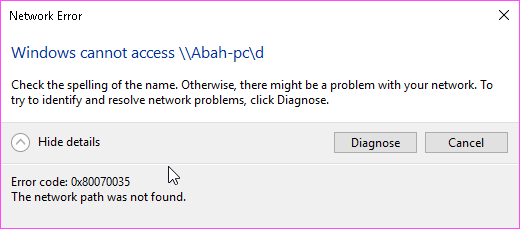
- Error code: 0x80070035. The network path was not found
Things I’ve tried, but no success:
- Reinstall network driver, including the hidden adapters
- Windows features SMB 1.0/CIFS Client
- Disabled Windows Defender Firewall
- Reconfigure folder sharing options
- Manual IP address
- Enable NetBIOS over TCP/IP
- Reset Internet Explorer settings
- Uncheck Internet Explorer Proxy server
- ipconfig /release
- ipconfig /flushdns
- ipconfig /renew
- nbtstat –r
- netsh int ip reset
- netsh winsock reset
- Turn off password protected sharing
- Turn ON Network Discovery
- Delete all Windows credentials
- Modify the Network Security settings
- Blah… blah… blah…
Solution, that worked for me:
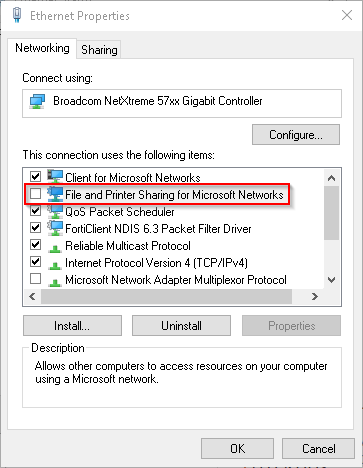
- Turn OFF the “File and Printer Sharing for Microsoft Networks” in Ethernet Properties > click the OK button
- Turn ON the “File and Printer Sharing for Microsoft Networks” in Ethernet Properties > click the OK button
 Hilman Family Blog